Practical guide
WhatsApp follow-up: how to resume conversations without losing context
Guide to structure WhatsApp follow-ups, define the next contact, and resume leads with commercial context.
CRMAI
6 min read
Practical guide in English
With product screenshots
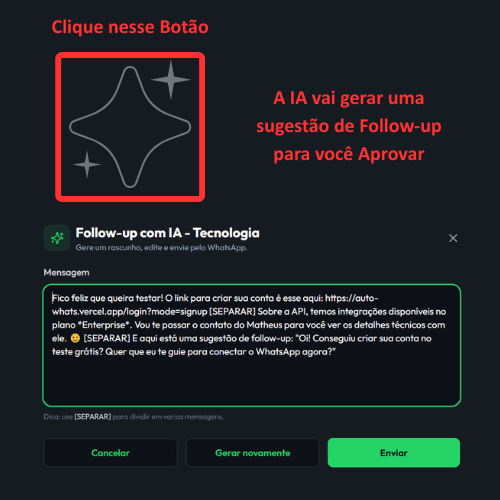
Follow-up with AI
What you will learn: how to generate a draft with AI, review and send it via WhatsApp.
- Click the "glow" (AI) icon next to the lead.
- Edit the text to stay true to your tone and what you agreed with the client.
- Send and track the response in the Conversations tab.
Want to see this flow in practice?
Inside the product, this step appears in: Open Leads · Open Conversations.
Next step
If this flow makes sense for your operation, the fastest path is to start a free trial and see AI running inside your own WhatsApp.
Related guides
WhatsApp CRM and leads: how to organize your funnel
Learn how to read your lead list, filter contacts, review AI suggestions, and keep CRM organized on WhatsApp.
How to train AI for WhatsApp support
Practical guide to configure your business, services, tone of voice, FAQs, and handoff rules inside AutoWhats AI.